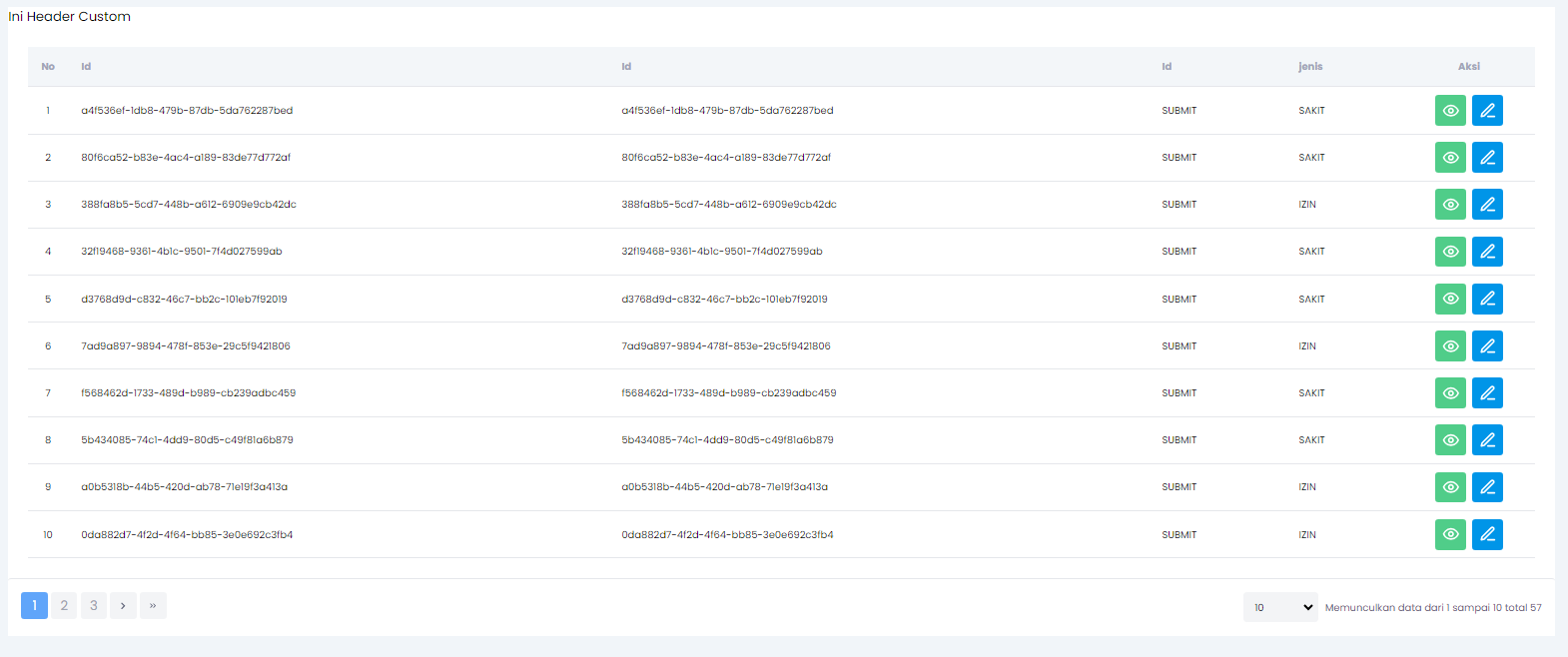
Implementasi Override Header TableLowcode
Contoh Sebelum dicustom
Contoh Data salah satu data dari List yang diterima
 {
  "id": "",
  "jenis_pengajuan": "SAKIT",
  "tanggal": "25/01/2024",
  "jam_mulai": "15:00",
  "jam_selesai": "17:00",
  "keterangan": "asdfasdf",
  "dokumen_pendukung": "",
  "action": "SUBMIT",
  "process_instance_id": "2251799814423457",
  "tasks": [],
  "finished_tasks": [],
  "instance_variable": [],
  "user": {},
  "created_at": "2024-01-24T09:19:35.362448Z",
  "updated_at": "2024-01-24T09:19:35.488393Z"
}
Contoh Spec nya
const spec = {
  show_as_menu: true,
  name: 'payslip',
  is_bpmn: true,
  is_usertask: false,
  can_bulk: false,
  can_create: true,
  can_delete: false,
  can_edit: true,
  can_detail: true,
  label: 'Takwim',
  base_url: import.meta.env.VITE_API_BASEURL,
  path: '/workflow/v1/bpmn/pengajuanizin',
  description: 'Field Dari Takwim',
  header_action: [
    {
      label: 'Tambah',
      action_label: 'Tambah Pengajuan',
      method: 'post',
      form_type: 'new_page',
      path: '/workflow/v1/bpmn/pengajuanizin',
      icon: 'plus',
      type: 'primary',
    },
  ],
  field_action: [
    {
      label: 'Detail',
      action_label: 'Detail Payslip',
      method: 'get',
      form_type: 'modal',
      path: '/workflow/v1/bpmn/pengajuanizin/{id}',
      icon: 'eye',
      type: 'primary',
    },
    {
      label: 'Edit',
      action_label: 'Kemaskini Takwim',
      method: 'put',
      form_type: 'modal',
      path: '/workflow/v1/bpmn/pengajuanizin/{id}',
      icon: 'edit',
      type: 'primary',
    },
    {
      label: 'Hapus',
      action_label: 'Hapus Takwim',
      method: 'delete',
      form_type: 'confirm_modal',
      confirm: {
        title: 'Hapus Data',
        message: 'Adakah anda pasti ingin memadam data ini?',
        confirm_text: 'Ya, Teruskan',
        cancel_text: 'Batal',
      },
      path: '/workflow/v1/bpmn/pengajuanizin/{id}',
      icon: 'trash',
      type: 'danger',
    },
  ],
  fields: {
    id: {
      name: 'id',
      label: 'Id',
      required: true,
      searchable: false,
      filterable: false,
      sortable: true,
      type: 'number',
      form_field_type: 'INPUT_NUMBER',
      primary: false,
      is_hidden_in_create: true,
      is_hidden_in_edit: true,
      is_hidden_in_list: false,
      is_hidden_in_detail: true,
      rules: ['required', 'integer'],
      format: '',
      prefix: '',
      suffix: '',
      list_order: 6,
      create_order: 6,
      edit_order: 6,
    },
    jenis_pengajuan: {
      name: 'id',
      label: 'Id',
      required: true,
      searchable: false,
      filterable: false,
      sortable: true,
      type: 'number',
      form_field_type: 'INPUT_NUMBER',
      primary: false,
      is_hidden_in_create: true,
      is_hidden_in_edit: true,
      is_hidden_in_list: false,
      is_hidden_in_detail: true,
      rules: ['required', 'integer'],
      format: '',
      prefix: '',
      suffix: '',
      list_order: 6,
      create_order: 6,
      edit_order: 6,
    },
    action: {
      name: 'action',
      label: 'Id',
      required: true,
      searchable: false,
      filterable: false,
      sortable: true,
      type: 'number',
      form_field_type: 'INPUT_NUMBER',
      primary: false,
      is_hidden_in_create: true,
      is_hidden_in_edit: true,
      is_hidden_in_list: false,
      is_hidden_in_detail: true,
      rules: ['required', 'integer'],
      format: '',
      prefix: '',
      suffix: '',
      list_order: 6,
      create_order: 6,
      edit_order: 6,
    },
    jam_mulai: {
      name: 'jenis_pengajuan',
      label: 'jenis',
      required: true,
      searchable: false,
      filterable: false,
      sortable: true,
      type: 'number',
      form_field_type: 'INPUT_STRING',
      primary: false,
      is_hidden_in_create: true,
      is_hidden_in_edit: true,
      is_hidden_in_list: false,
      is_hidden_in_detail: true,
      rules: ['required', 'integer'],
      format: '',
      prefix: '',
      suffix: '',
      list_order: 6,
      create_order: 6,
      edit_order: 6,
    },
  },
}
Contoh cara pemanggilan TableLowcode nya yang cell nya belum di custom
<TableLowcode
  title="List Pengajuan Izin"
  spec={spec}
  data={data?.content}
  isLoadingData={isLoading}
  pagination={pagination}
  baseUrl={import.meta.env.VITE_API_BASEURL}
  renderState={renderState}
  setRenderState={setRenderState}
  pageConfig={pageConfig}
  setPageConfig={setPageConfig}
  filterBy={filterBy}
  setFilterBy={setFilterBy}
  search={search}
  setSearch={setSearch}
  orderBy={orderBy}
  setOrderBy={setOrderBy}
  sortBy={sortBy}
/>
Hasil nya
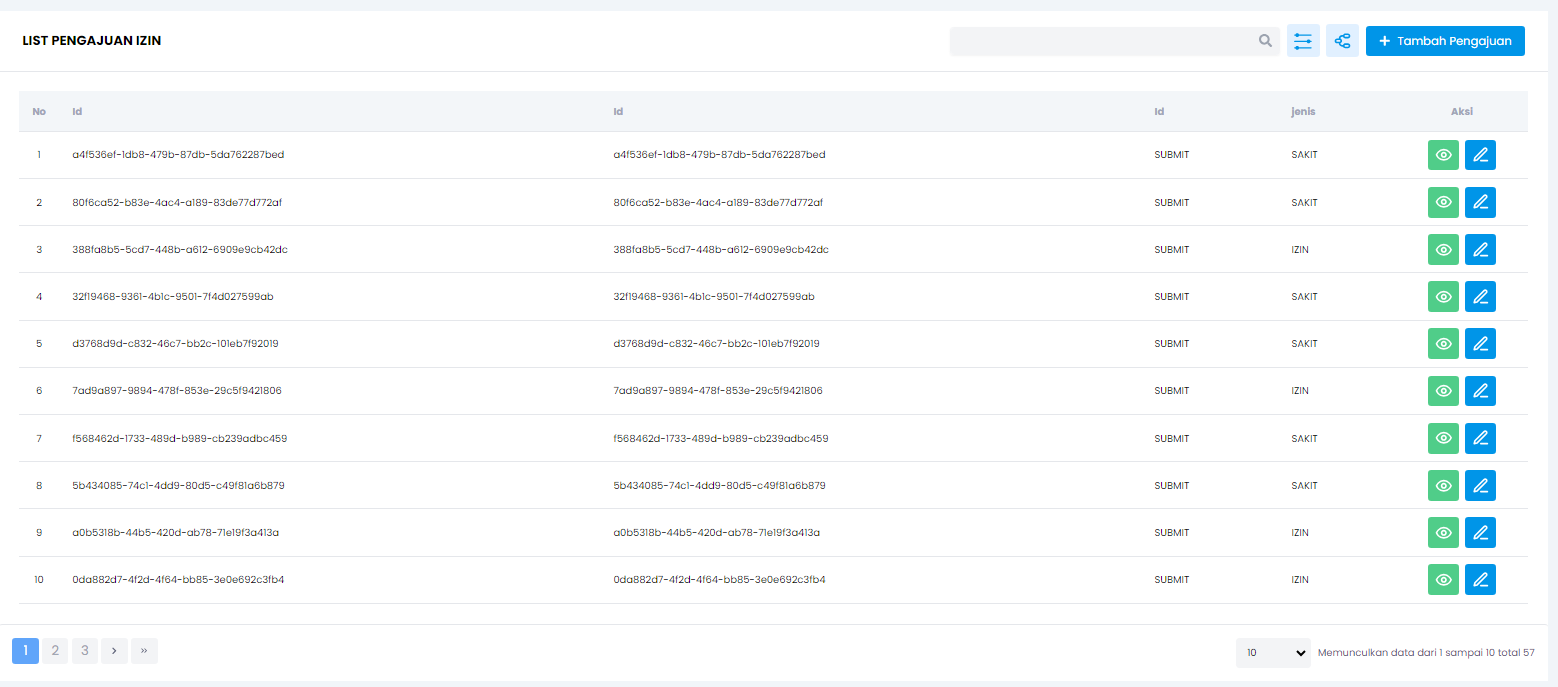
Goals nya disini ingin mengcustom Header nya tableLowcode
sebelumnya perlu diketahuio terlebih dahulu bagian mana yang termasuk Header TableLocode, dengan mengatahuinya maka programmer pun ak mengetahui impact fitur apa saja yang perlu dibuat seeprti search, filter, dsb
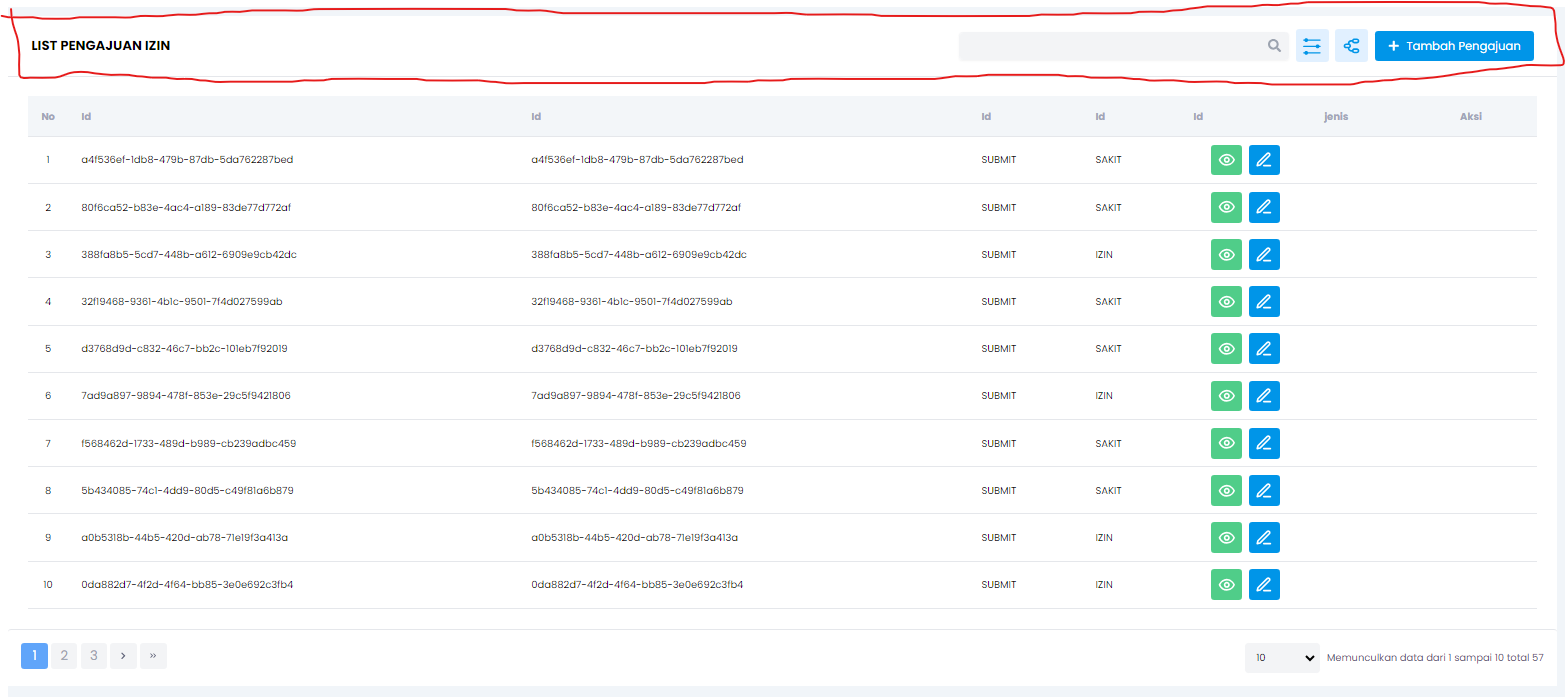
caranya:
- buat fungsi customHeader yang mereturn JSX.element
const customHeader = () => {
  return <div>Ini Header Custom</div>
}
- kirim lewat props
<TableLowcode
  ...props yang udh ada sebelumnya
  customHeader={customHeader}
/>