Membuat CRUD dengan React Hook Form
yang perlu deketahui:
- useForm dari React Hook Form
- TableLowcode dari Alurkerja
- axios
yang dibutuhkan
- API yang response nya standard alurkerja
Contoh
Developer diminta membuat halaman list yang berisikan table, di table tersebut terdapat button aksi yang mana aksinya digunakan untuk navigasi kehalaman tertentu contohnya halaman create, detauk, edit dsb
caranya adalah:
- gunakan TableLowcode untuk mempercepat membuat table
anggap response api nya seperti ini
spec
{
  data:
  {
    "show_as_menu": true,
    "name": "testing.projects",
    "is_bpmn": false,
    "is_usertask": false,
    "can_bulk": false,
    "can_create": true,
    "can_delete": true,
    "can_edit": true,
    "can_detail": true,
    "label": "Testing.projects",
    "base_url": "https://nocodeapi.merapi.javan.id",
    "path": "/api/data",
    "description": "Field Dari Projects",
    "header_action": [
      {
        "label": "Tambah",
        "action_label": "Tambah Projects",
        "method": "post",
        "form_type": "new_page",
        "path": "/api/data",
        "icon": "plus",
        "type": "primary"
      }
    ],
    "field_action": [
      {
        "label": "Detail",
        "action_label": "Detail Projects",
        "method": "get",
        "form_type": "modal",
        "path": "/api/data/{id}",
        "icon": "eye",
        "type": "primary"
      },
      {
        "label": "Edit",
        "action_label": "Edit Projects",
        "method": "put",
        "form_type": "modal",
        "path": "/api/data/{id}",
        "icon": "edit",
        "type": "primary"
      },
      {
        "label": "Hapus",
        "action_label": "Delete Projects",
        "method": "delete",
        "form_type": "confirm_modal",
        "confirm": {
          "title": "Hapus Data",
          "message": "Apakah anda yakin ingin menghapus data ini?1",
          "confirm_text": "Lanjutkan",
          "cancel_text": "Batal"
        },
        "path": "/api/data/{id}",
        "icon": "trash",
        "type": "danger"
      }
    ],
    "languages": {
      "pagination_info": "Memunculkan data dari {page} sampai {limit} total {total}",
      "empty_data": "Tidak ada data yang ditampilkan",
      "filter_title": "Filter",
      "filter_submit": "Filter",
      "filter_reset": "Clear Filter",
      "filter_cancel": "Kembali"
    },
    "fields": {
      "id": {
        "name": "id",
        "label": "Id",
        "required": true,
        "searchable": false,
        "filterable": true,
        "sortable": true,
        "type": "number",
        "form_field_type": "INPUT_NUMBER",
        "primary": true,
        "is_hidden_in_create": true,
        "is_hidden_in_edit": true,
        "is_hidden_in_list": false,
        "is_hidden_in_detail": false,
        "rules": ["required", "integer"],
        "format": "",
        "prefix": "",
        "suffix": "",
        "list_order": 1,
        "create_order": 1,
        "edit_order": 1
      },
      "name": {
        "name": "name",
        "label": "Name",
        "required": true,
        "searchable": true,
        "filterable": true,
        "sortable": true,
        "type": "text",
        "form_field_type": "INPUT_TEXT",
        "primary": false,
        "is_hidden_in_create": false,
        "is_hidden_in_edit": false,
        "is_hidden_in_list": false,
        "is_hidden_in_detail": false,
        "rules": ["required", "string", "max:255"],
        "format": "",
        "prefix": "",
        "suffix": "",
        "list_order": 2,
        "create_order": 2,
        "edit_order": 2
      },
      "description": {
        "name": "description",
        "label": "Description",
        "required": true,
        "searchable": true,
        "filterable": true,
        "sortable": true,
        "type": "text",
        "form_field_type": "INPUT_TEXT",
        "primary": false,
        "is_hidden_in_create": false,
        "is_hidden_in_edit": false,
        "is_hidden_in_list": false,
        "is_hidden_in_detail": false,
        "rules": ["required", "string", "max:255"],
        "format": "",
        "prefix": "",
        "suffix": "",
        "list_order": 3,
        "create_order": 3,
        "edit_order": 3
      },
      "created_at": {
        "name": "created_at",
        "label": "Created At",
        "required": false,
        "searchable": false,
        "filterable": true,
        "sortable": true,
        "type": "datetime-local",
        "form_field_type": "INPUT_DATETIME-LOCAL",
        "primary": false,
        "is_hidden_in_create": true,
        "is_hidden_in_edit": true,
        "is_hidden_in_list": true,
        "is_hidden_in_detail": false,
        "rules": ["nullable", "date_format:Y-m-d H:i:s"],
        "format": "DD-MM-YYYY HH:mm:ss",
        "prefix": "",
        "suffix": "",
        "list_order": 4,
        "create_order": 4,
        "edit_order": 4
      },
      "updated_at": {
        "name": "updated_at",
        "label": "Updated At",
        "required": false,
        "searchable": false,
        "filterable": true,
        "sortable": true,
        "type": "datetime-local",
        "form_field_type": "INPUT_DATETIME-LOCAL",
        "primary": false,
        "is_hidden_in_create": true,
        "is_hidden_in_edit": true,
        "is_hidden_in_list": true,
        "is_hidden_in_detail": false,
        "rules": ["nullable", "date_format:Y-m-d H:i:s"],
        "format": "DD-MM-YYYY HH:mm:ss",
        "prefix": "",
        "suffix": "",
        "list_order": 5,
        "create_order": 5,
        "edit_order": 5
      }
    }
  }
}
data
{
  "content": [
    {
      "id": 3,
      "name": "TEsting",
      "description": "Testing",
      "created_at": "2023-12-18T06:53:09.000000Z",
      "updated_at": "2023-12-18T06:53:09.000000Z"
    },
    {
      "id": 4,
      "name": "Testing lagi",
      "description": "yang ini jadinya",
      "created_at": "2023-12-19T05:49:03.000000Z",
      "updated_at": "2023-12-19T05:49:03.000000Z"
    },
    {
      "id": 1,
      "name": "Hwlloe",
      "description": "Edit lagi dong",
      "created_at": null,
      "updated_at": "2023-12-19T05:49:11.000000Z"
    },
    {
      "id": 5,
      "name": "X-tra",
      "description": "Pengganti xtra.javan.co.id",
      "created_at": "2023-12-19T07:31:21.000000Z",
      "updated_at": "2023-12-19T07:31:21.000000Z"
    }
  ],
  "pageable": {
    "offset": 0,
    "paged": true,
    "unpaged": false
  },
  "total_page": 1,
  "total_elements": 4,
  "number_of_element": 4,
  "first": true,
  "last": true,
  "size": 15,
  "number": 0,
  "empty": false,
  "sort": {
    "sorted": false,
    "unsorted": true,
    "empty": false
  }
}
gunakan tableLowcode seperti ini
<TableLowcode
  baseUrl='https://kpm-sys.merapi.javan.id'
  specPath='/api/crud/jpn'
/>
munculah tampilan sepreti ini
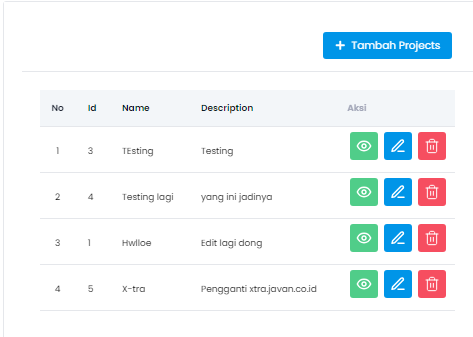
poin menampilkan halaman list sudah selesai, tinggal navigasi ke halaman aksi contoh button tambah, untuk membuat button tambah bisa bernavigasi ke halaman baru bisa gunakan props onClickCreate
buat fungsi nya
const navigate = useNavigate()

const onClickCreate = () => {
  return navigate('create')
}
teruskan via props
<TableLowcode
  baseUrl='https://kpm-sys.merapi.javan.id'
  specPath='/api/crud/jpn'
  onClickCreate={onClickCraete}
/>
di tableLowcode tidak perlu memikirkan axios karena sudah dihandle dilibrary
selanjutnya masuk kehalaman create buat form nya, untuk form disini bebas sesuai kebutuhan bisa menggunakan FormLowcode, React Hook Wrapper, ataupun tidak menggunakan kedua nya.
- Menggunakan FormLowcode
import { FormLowcode } from 'alurkerja-ui'
import { useForm } from 'react-hook-form'

export const FormLowcodePage = () => {
    const { formState, handleSubmit, control, setValue } = useForm()

    return(
        <FormLowcode
          title="Create"
          baseUrl="https://kpm-sys.merapi.javan.id"
          specPath="/api/crud/jpn"
          formState={formState}
          handleSubmit={handleSubmit}
          control={control}
          setValue={setValue}
        />
    )
}

jika ternyata fungsi submit nya tidak sesederhana yang bisa dilakukan oleh spec fungsi submit nya bisa dicustom via props onSubmit
import { FormLowcode, AuthContext } from 'alurkerja-ui'
import { useForm, FieldValues } from 'react-hook-form'

export const FormLowcodePage = () => {
    const { formState, handleSubmit, control, setValue } = useForm()
  const axiosInstance = useContext(AuthContext)
  const navigate = useNavigate()

    const onSubmit = (data: FieldValues) => {
    axios,post('/create', data).then((res) => {
      if(res.status === 201){
        navigate(-1)
      }
    })
    }

    return(
        <FormLowcode
          title="Create"
          baseUrl="https://kpm-sys.merapi.javan.id"
          specPath="/api/crud/jpn"
          formState={formState}
          handleSubmit={handleSubmit}
          control={control}
          setValue={setValue}
          onSubmit={onSubmit}
        />
    )
jika tidak ad yg dicustom tidak perlu dibuatkan fungsi menggunakan axios karena sudah dihanle library
atau jika field nya perlu dicustom? silahkan liat Custom Field FormLowcode
- Menggunakan React Hook Wrapper
import { ReactHookWrapper, Button,Input} from 'alurkerja-ui'
import { FieldValues, useForm } from 'react-hook-form'

export const ReactHookWrapperPage = () => {
    const { handleSubmit, control, setValue } = useForm()

    const onSubmit = (data: FieldValues) => {
    axios,post('/create', data).then((res) => {
      if(res.status === 201){
        navigate(-1)
      }
    })
    }

    return(
        <ReactHookWrapper control={control}>
          <Input
            name="name"
            aria-label="Name"
            required
            onChange={(e) => setValue(e.target.name, e.target.value)}
          />
          <Input
            name="description"
            aria-label="Description"
            required
            onChange={(e) => setValue(e.target.name, e.target.value)}
          />
        </ReactHookWrapper>
    )
}
React Hook Wrapper hanya membantu dibagian labeling, check validasi, dll tidak ada build in function submit nya sehingga harus membuat fungsi submit nya sendiri
- Tanpa FormLowcode & Tanpa React Hoow Wrapper
import { ReactHookWrapper, Button,Input} from 'alurkerja-ui'
import { FieldValues, useForm } from 'react-hook-form'

export const Createa = () => {
    const { handleSubmit, control, register } = useForm()

    const onSubmit = (data: FieldValues) => {
    axios,post('/create', data).then((res) => {
      if(res.status === 201){
        navigate(-1)
      }
    })
    }

    return(
        <form onSubmit={handleSubmit(onSubmit)}>
          <Input
            {...register('name')}
          />
          <Input
            {...register('description')}
          />
      <button>Submit</button>
        </form>
    )
}
ini hanya contoh, banyak alternatif lain misal menggunakan Contrller, atau diubah jadi controlled components
halaman edit/detail kurang lebih sama
Menggunakan FormLowcode tambahkan props id untuk edit, dan tambahkan props id + asDetail untuk halaman detail
menggunakan React Hook Wrapper lakukan HTTP Request Get untuk mendapatkan detail nya, lalu tampilkan di field nya, jika menggunakan register bisa langsung menggunakan setValue aja, namun jika menggunakan Controller atau yg lain maka perlu penggunakan props value dari setiap field nya
tanpa FormLowcode & tanpa React Hook Wrapper kurang lebih sama dengan poin 2
untuk delete jika sudah standar alurkerja sudah bisa langsung berjalan jika menggunakan tableLowcode, namun jika perlu ada custom makan bisa menggunakan props onClickDelete